

The wearable market has long been divided between full-featured smartwatches and simple fitness bands. Google's acquisition of Fitbit in 2021 promised to merge Fitbit's health-tracking expertise with Google's software might, but the result has been a gradual shift toward a unified platform. The latest entrant in this strategy is the Fitbit Air, a $100 fitness tracker that goes against the trend of bigger screens and more notifications. Instead, it offers a tiny puck of sensors you can easily forget you're wearing. The Air is the first device designed from the ground up for the new Google Health platform, which replaces the old Fitbit app and introduces an AI-powered coach as a premium feature. This review explores whether the hardware lives up to its minimalist promise and whether the AI companion adds value or just noise.
Hardware and Design
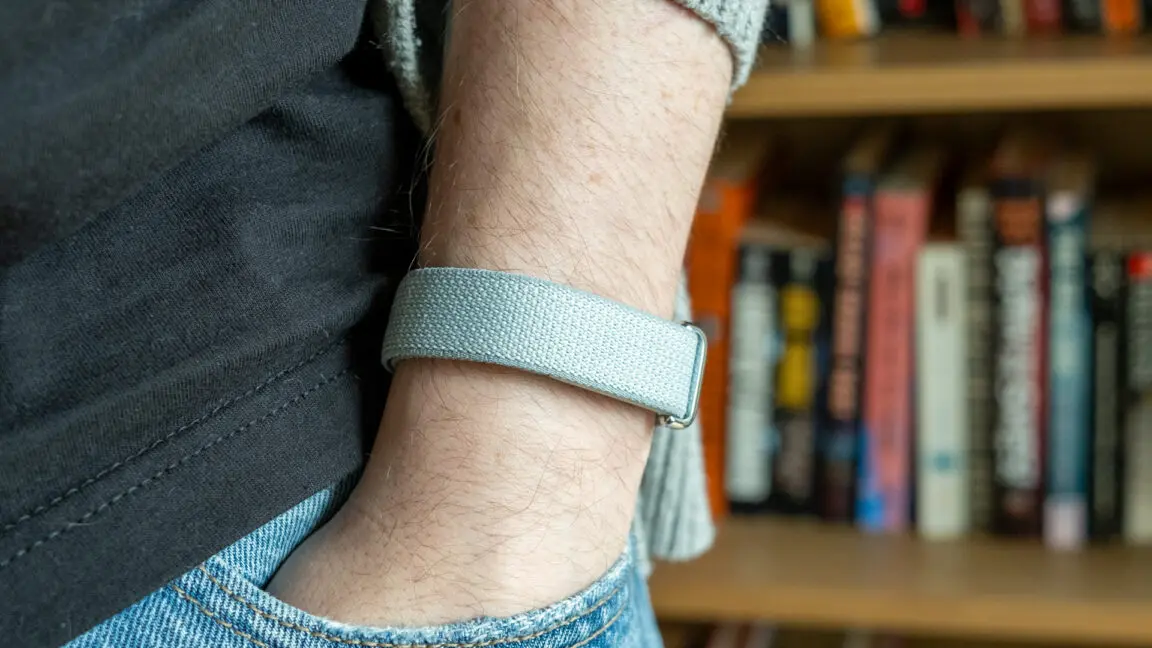
The Fitbit Air is remarkably simple. It has no display, no buttons, and only a single LED on the side to indicate battery level. A double-tap on the tracker triggers the LED to show green, yellow, or red, but that's the extent of on-device interaction. There is no speaker, and the vibration motor is limited to alarms; it cannot sync with phone notifications. This makes sense—without a screen, you would have no way to know what a buzz meant. The device itself is a small puck, barely larger than the sensor cluster it houses. The back holds optical sensors for heart rate, blood oxygen, and skin temperature. It lacks an ECG sensor, which is a notable omission for those who want advanced heart health features. However, for most users, the core metrics of steps, heart rate, sleep, and readiness will suffice.
The Air comes with one of three bands: the Performance Band, the Active Band, or the Elevated Band. The stock Performance Band is made of a smooth polyester yarn with Velcro and a metal loop. It is durable but tends to absorb moisture, making it less ideal for swimming or heavy sweating. The $35 silicone Active Band hides the puck more effectively and looks sporty. The $50 Elevated Band offers a more understated polyurethane option, but spending half the cost of the tracker on a band seems excessive. Third-party band options are expected to grow, but Google's proprietary connector from the Pixel Watch era has shown how limited aftermarket support can be. The Air uses a simple snap-in mechanism, which should encourage more third-party options over time.
The lack of a screen means the band can be very lightweight—the entire device weighs only a few grams. It sits flush against the wrist and is comfortable enough for 24/7 wear, including sleep tracking. The battery life is rated at seven days, which holds up well in real-world use. Even users who are fussy sleepers will find it unobtrusive at night. The device automatically detects workouts using its sensor array, logging them in the Google Health app. However, without a screen, live stats during exercise must be viewed on your phone, which can be inconvenient for dedicated athletes.
Sensor Accuracy and Data Quality
Beneath the simple exterior, the Fitbit Air packs the same sensor suite found in many high-end smartwatches. The heart rate monitor uses photoplethysmography (PPG) to track beats per minute, and the SpO2 sensor measures blood oxygen levels during sleep. Skin temperature sensing can help detect changes in body temperature that may indicate illness. The accuracy of these sensors is competitive with other wrist-worn devices. Sleep tracking successfully detects sleep stages and provides a fairly reliable readiness score each morning. The readiness score combines recent activity, heart rate variability (HRV), and sleep quality to suggest how prepared you are for exertion. In practice, it often aligns with how users feel subjectively, which is the gold standard for such metrics.
The data feeds into the Google Health app, which has been redesigned compared to the old Fitbit interface. New users will find it intuitive, with clear graphs and daily summaries. However, longtime Fitbit users may lament the loss of features like blood pressure tracking (via third-party cuffs) and custom meal creation. The app also lacks layout customization, though Google has promised updates. The quality of the data itself is good, with minimal dropouts or errors. The smart alarm that wakes you during light sleep works effectively, and workout detection is reasonably accurate for walking, running, and cycling. For a screenless tracker, the Air does an excellent job of collecting health data without demanding user interaction.
The Software Experience and Google Health Coach
The main differentiator for the Fitbit Air is the software platform it belongs to. Google Health replaces the Fitbit app and introduces an AI-powered Health Coach for Premium subscribers ($10/month or bundled with certain Google One plans). The device comes with a three-month trial of Premium, so most users will immediately experience the Health Coach. The coach is based on Google's Gemini large language model, fine-tuned for health conversations and grounded in the data collected by the wearable. It generates daily summaries, proactive insights, and words of affirmation. In theory, this could be a compelling way to make health data more actionable.
In practice, the Health Coach suffers from the same issues that plague many AI chatbots. It tends to be verbose, offering lengthy explanations of obvious patterns. For example, after a night of poor sleep, it might suggest eliminating awakenings without understanding real-world constraints like a crying baby or an early work schedule. Users can provide context—telling the coach about travel or responsibilities—and it will adjust its recommendations accordingly. This contextual adaptation is impressive and shows the potential of personalized AI. The coach can also answer questions about your data, though it sometimes hallucinates, inventing workouts based on brief heart rate spikes or claiming data doesn't exist when it is visible elsewhere.
The biggest criticism is the tone. The coach is relentlessly cheerful, offering grandiose praise for hitting goals and peppy encouragement for missing them. While some users may appreciate this, others may find it cringey or unnecessary. The summaries often state the obvious in many words: “Make sure to rest after a big workout. Maybe go for a light walk.” The core insight is trivial, but the AI wraps it in flowery language. Moreover, the summaries take up significant real estate in the app, pushing aside the clean data views that free users enjoy. Free users see a more compact interface with graphs and logs, which is arguably more useful for monitoring trends.
Should You Subscribe to Premium?
The decision to keep Premium comes down to whether the Health Coach adds enough value. For users who engage in structured training and want conversational logging of meals or workouts, the coach could be a handy tool. But for casual users, the free tier provides all the essential data without the clutter. Google has made it somewhat difficult to disable the coach—the toggle is buried under profile > Your data > Feature Control > Google Health Coach. Even after turning it off, an “Ask Coach” button remains in the app, tempting a reactivation. This is typical of Google's strategy to push its AI services, but it can feel intrusive. The Coach is not a bad feature per se, but it is not yet essential. For now, the best argument for Premium is access to additional detailed sleep analysis and readiness trends, which are also available in other apps for less money.
The Fitbit Air itself is a strong value at $100, undercutting many competitors. It is more affordable and simpler than the Whoop band, which requires a minimum $200 annual subscription and lacks its own hardware. The Air also works harmoniously in the Google Health app alongside Pixel Watch users, allowing family or friend groups to consolidate their health data. This ecosystem integration is a subtle plus.
The Broader Context: AI in Wearables
Google's emphasis on an AI coach is part of a larger industry trend. Apple, Samsung, and others are integrating AI into their health platforms, offering personalized recommendations and coaching. The Fitbit Air is a testbed for this approach. The hardware is deliberately simple to focus attention on the software, and the coach is designed to be always present. However, the execution reveals the immature state of consumer health AI. The technology can follow instructions well and produce coherent text, but it often misses nuance and produces outputs that feel superficial. The best wearable health apps today rely on well-designed dashboards and actionable notifications, not verbose chat. It remains to be seen whether users will embrace a chatty AI as a daily health partner or dismiss it as a gimmick.
The Fitbit Air succeeds as a minimalist fitness tracker. It is comfortable, accurate, and lasts a week on a charge. For those who want to escape the distractions of smartwatches, it is an excellent choice. But the premium AI experience is not yet a compelling reason to subscribe. The final word on the Air is that it delivers reliable tracking with an optional, sometimes bothersome, AI assistant. The good: looks nice, extremely lightweight, long battery life, accurate tracking, and seamless coexistence with Pixel Watch in the app. The bad: no ECG, expensive official bands. The ugly: the chipper, long-winded Health Coach adds little value. If you can ignore the AI or turn it off, the Air is a worthwhile investment for a no-nonsense health tracker.
Source:Ars Technica News